Save time, space, and money on your next audio amplifier installation with the Ashly FX750.4, a multipurpose installation amplifier with integrated DSP and a built-in WAP hotspot for simple connection and configuration via Wi-Fi as well as an intuitive web-based software UI. The amplifier also features an Ethernet connection for wired LAN connections—no network router required.
The four-channel Class-D amplifier supplies 750W of power per channel or 1500W per bridged pair. The onboard DSP provides all the facets of a standalone speaker processor, complete with EQ, delay, compression, limiting, phase, and more. It's a complete solution that's simple to set up and navigate. The FX750.4 includes a pair of rack ears, a power cord, and block connectors.
At a Glance
Low (2/4/8 ohms and 25V) or hi-impedance (70/100V) operation, selectable in software
Balanced Mic/Line inputs on removable Euroblock connectors, plus unbalanced RCA inputs
2-channel SPDIF digital IO
Front-panel status LEDs for amp, input, output, and network
Networkable via Ethernet or built-in Wi-Fi
Built-in advanced DSP on all inputs and outputs including: Sensitivity, Routing, Gain, PEQ, Compressor, Limiter, FIR filters, X-over, Polarity, and Delay
Browser-based UI accessed via PC or mobile device—no software to install
4 input channels x 4 output channels
Auto/Manual Power Saver Mode (sleep/standby), adjustable in software
Customized speaker presets may be created, saved, and loaded for each output channel
Addressable GPIO, Standby/Mute, and VC remote ports. VC assignable per channel via software
Highly efficient Class-D circuitry and lightweight
2 RU
Includes two rack ears for standard 19" equipment racks
Intelligent DSP
Powerful DSP engine that can be configured to suit a wide range of tasks without the need for additional equipment. From processing input sources, routing, and output DSP that can fine tune the sound of any speaker. Everything you need is right there. These can route into Zones A-D and then into the 4 outputs.
4-channel DSP configuration including:
Input processing
Zone processing
Output processing
Speaker processing
Device settings
The FX Series is capable of handling a variety of applications, such as:
Multi-zone music distribution for retail and restaurant/bar
Noise masking for offices and medical facilities
Media playback for hotel lobbies, retail, and museum kiosks
Mobile sound
The FX DSP engine provides a rich selection of functions for getting the most out of your system. Here’s what you get with the FX onboard DSP:
Dashboard: status display, level control, and metering for Zones A-D
Inputs: Gain/Trim, Sensitivity
Zones: source select, mono/stereo, level control, and metering as well as GPIO assignment and Compressor for Zones A-D
Outputs: Routing (from Zones A-D), Delay (up to 100ms), 10-bands of fully parametric EQ for outputs 1 through 4
Speaker presets: Save/Load/Select from Library, Custom: X-over and Gain, 11-band speaker EQ (fully parametric), FIR filter import, Speaker alignment delay (up to 10ms), Polarity, Limiter (Clip, Peak, and RMS), and Output mode (Low/Hi-Z)
Settings: System and Device info, Backup and Restore, Speaker Preset Library, Power Management (standby/sleep, auto/manual), GPIO settings, LAN, and Wi-Fi
The amplifier provides 4 mic/line inputs, so you get the power of a 4-input mixer, zone matrix, plus output and speaker processing. With all that, FX can be a true “one-box” solution for many applications.
Intuitive Software UI
To control FX’s powerful DSP, you’ll find its user-friendly software interface that offers an intuitive workflow and easy access to FX’s most advanced functions. A webpage-like directory on the left-hand side of the UI keeps all necessary functions clearly visible and accessible at all times. No multi-page layering, no right-click or hidden menus, and no getting “lost in the weeds”.
FX Dashboard: Quickly see the amp’s status displayed, along with Zone controls. The directory then takes you through the signal flow from Inputs to Zones to Outputs, followed by general settings—easy and simple.
Create, save, and load speaker presets to accommodate virtually any loudspeaker. These can be loaded independently per channel, so different speakers may be used for different zones, or satellites and subs may be used for a bar or auditorium.
The FX UI screens are well laid out, with consistent controls from page to page that are informative and easy to read. All device information and operations are at your fingertips. From input / output settings and remote assignments to power and IP.
Save time, space, and money on your next audio amplifier installation with the Ashly FX750.4, a multipurpose installation amplifier with integrated DSP and a built-in WAP hotspot for simple connection and configuration via Wi-Fi as well as an intuitive web-based software UI. The amplifier also features an Ethernet connection for wired LAN connections—no network router required.
The four-channel Class-D amplifier supplies 750W of power per channel or 1500W per bridged pair. The onboard DSP provides all the facets of a standalone speaker processor, complete with EQ, delay, compression, limiting, phase, and more. It's a complete solution that's simple to set up and navigate. The FX750.4 includes a pair of rack ears, a power cord, and block connectors.
At a Glance
Low (2/4/8 ohms and 25V) or hi-impedance (70/100V) operation, selectable in software
Balanced Mic/Line inputs on removable Euroblock connectors, plus unbalanced RCA inputs
2-channel SPDIF digital IO
Front-panel status LEDs for amp, input, output, and network
Networkable via Ethernet or built-in Wi-Fi
Built-in advanced DSP on all inputs and outputs including: Sensitivity, Routing, Gain, PEQ, Compressor, Limiter, FIR filters, X-over, Polarity, and Delay
Browser-based UI accessed via PC or mobile device—no software to install
4 input channels x 4 output channels
Auto/Manual Power Saver Mode (sleep/standby), adjustable in software
Customized speaker presets may be created, saved, and loaded for each output channel
Addressable GPIO, Standby/Mute, and VC remote ports. VC assignable per channel via software
Highly efficient Class-D circuitry and lightweight
2 RU
Includes two rack ears for standard 19" equipment racks
Intelligent DSP
Powerful DSP engine that can be configured to suit a wide range of tasks without the need for additional equipment. From processing input sources, routing, and output DSP that can fine tune the sound of any speaker. Everything you need is right there. These can route into Zones A-D and then into the 4 outputs.
4-channel DSP configuration including:
Input processing
Zone processing
Output processing
Speaker processing
Device settings
The FX Series is capable of handling a variety of applications, such as:
Multi-zone music distribution for retail and restaurant/bar
Noise masking for offices and medical facilities
Media playback for hotel lobbies, retail, and museum kiosks
Mobile sound
The FX DSP engine provides a rich selection of functions for getting the most out of your system. Here’s what you get with the FX onboard DSP:
Dashboard: status display, level control, and metering for Zones A-D
Inputs: Gain/Trim, Sensitivity
Zones: source select, mono/stereo, level control, and metering as well as GPIO assignment and Compressor for Zones A-D
Outputs: Routing (from Zones A-D), Delay (up to 100ms), 10-bands of fully parametric EQ for outputs 1 through 4
Speaker presets: Save/Load/Select from Library, Custom: X-over and Gain, 11-band speaker EQ (fully parametric), FIR filter import, Speaker alignment delay (up to 10ms), Polarity, Limiter (Clip, Peak, and RMS), and Output mode (Low/Hi-Z)
Settings: System and Device info, Backup and Restore, Speaker Preset Library, Power Management (standby/sleep, auto/manual), GPIO settings, LAN, and Wi-Fi
The amplifier provides 4 mic/line inputs, so you get the power of a 4-input mixer, zone matrix, plus output and speaker processing. With all that, FX can be a true “one-box” solution for many applications.
Intuitive Software UI
To control FX’s powerful DSP, you’ll find its user-friendly software interface that offers an intuitive workflow and easy access to FX’s most advanced functions. A webpage-like directory on the left-hand side of the UI keeps all necessary functions clearly visible and accessible at all times. No multi-page layering, no right-click or hidden menus, and no getting “lost in the weeds”.
FX Dashboard: Quickly see the amp’s status displayed, along with Zone controls. The directory then takes you through the signal flow from Inputs to Zones to Outputs, followed by general settings—easy and simple.
Create, save, and load speaker presets to accommodate virtually any loudspeaker. These can be loaded independently per channel, so different speakers may be used for different zones, or satellites and subs may be used for a bar or auditorium.
The FX UI screens are well laid out, with consistent controls from page to page that are informative and easy to read. All device information and operations are at your fingertips. From input / output settings and remote assignments to power and IP.
 (585) 405-4375
 contact@echotonemusic.net




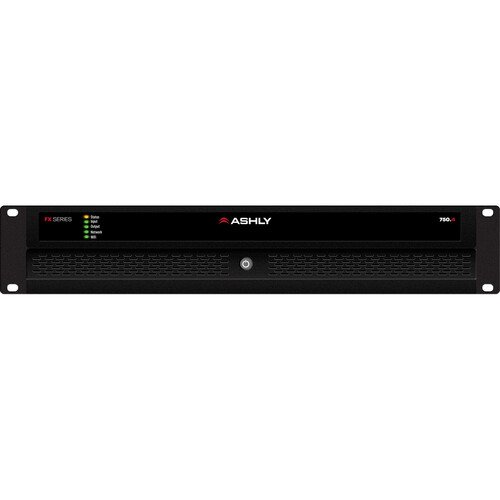 Image 1 of 2
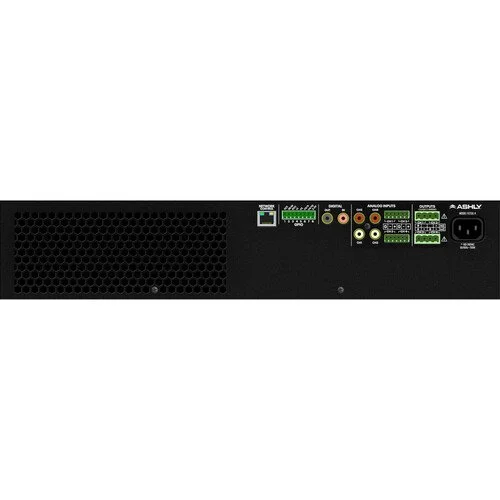 Image 2 of 2